The SQL Count is an important function that I use when I am exploring a new table.
I often use it to see how big a table is, but I also use it to determine counts within a group.
Let-s take a look at it-s uses.
Here is the employee table:
select *
from employee;
Results:

You can tell this has 14 records, but imagine that it had 1,000,000 records.
You wouldn-t be able to just **select *** without it taking a while to bring all of the records back.
That is where the **SQL Count** comes in:
select count(*)
from employee;

Here you can see it gave us one column with the count of the whole table.
Pretty simple.
Now, what if we wanted to find out how many people had a commission?
If we look above, we can simply count those people. But, we have this new SQL Count function.
So, let-s use it:
select count(commision)
from employee;Will we get 14 records, or 4 records?
Well, here are the results:
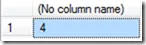
We only got 4 records. Why is that-?
That is because the count function doesn-t count NULL records. Again, if you look above, you will see a bunch of commissions that have the value of NULL.
This NULL value means we don-t have a value. So, when the SQL Count function looks at those rows, it ignores them.
But, look at the 10th row above. It has a -0.00- value. Why does it count that one?
Because, even though the value is 0, it is still a value (it isn-t null).
An that-s it. That-s how you use the **SQL Count **function.