Today I want to talk about SQL Functions and how they are used in the SQL language.
Let-s start by looking at a simple employee table.
select * from employee;

This employee table has 14 rows.
Now, there are some built-in SQL Functions that allow you to average, sum, get the max and minimum and count. (There are others too, but I am only mentioning a few.)
These functions will look at a group of rows and perform the required action.
So, what if I want to get the **average salary** of all 14 of my employees?
Then I would do the following:
select AVG(salary) from employee;
The average function is actually just **AVG** and you put the column in between the parenthesis.
Here are the results:

So the average salary is 2073.21-
That was pretty easy. But, what if you want the column to have a name?
select AVG(salary) as average_salary from employee;
You do what is called a **column alias**. After you put the column in (in this case AVG(salary) ) you put in the -as- keyword, then you put whatever you want to name the column. (In this case I called the column average_salary)
And here is the result:

And now your column has a name.
So now let me go ahead and use the rest of the functions I mentioned.
select
AVG(salary) as average_salary
,sum(salary) as sum_salary
,min(salary) as min_salary
,max(salary) as max_salary
,count(salary) as count_salary
from employee;
And here are the results:

Not too difficult- But, I want to try one more thing.
I want to use the **SUM** function and the **COUNT** function to create my own average function.
If you remember from Algebra, the average is calculated by summing all of the values and dividing by the number of values.
So let-s give it a try:
select sum(salary)/count(salary) as my_new_average
from employee;Notice how I took the Sum/Count.
Here is the result:
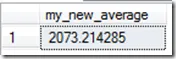
Notice that the value is the same as when we used the built in average function. That is what we would expect.
So that is an introduction into SQL Functions.
Leave any question, comments, or topic suggestions bellow.