The basis for retrieving data from a relational database like Microsoft SQL Server, Oracle, and MySQL is the SQL Select Statement.
The minimal SQL Select Statement if you were trying to get data from a table named -Customer- would be:
select * from customer;Here are the results from that query:
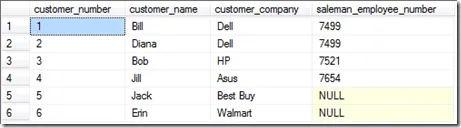
You can see that we have a table. You might say it looks like a Microsoft Excel spreadsheet.
It has columns: customer_number, customer_name, customer_company, salesman_employee_number.
And, it has 6 rows.
So there are two keys to the Select statement above.
First:
select *
The -Select- word is a keyword that you start your query with.
The -- means we want all columns* from the table.
Second:
from customer;
The -from- word is a keyword that says you are getting ready to tell the database what table you want.
The -customer- word means you want that table.
The final thing to notice is the -;-. This tells the database that you are done with your Select Statement.
It is optional in Microsoft SQL Server, but it is good to know about.
Now, if you only wanted to bring back the customer_name and the customer_company from the table,
the query (select statement) would be as follows:
select customer_name,customer_company
from customer;
Here are the results from that query:
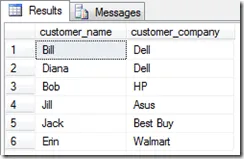
And that is the basics of the SQL Select Statement.
Post any questions and comments below. I always read every comment.