The SQL Where clause in the SQL Language allows you to filter data when you query a database.
Let-s look at the following query that gets data from the customer table:
select * from customer;
Here are the results:

Now, I only need to get the -Dell- customers. In order to do that, I have to use the **where** clause.
Let-s add that to the query:
select * from customer where customer_company='Dell';
When I execute this query, I get the following results:

So I have filtered the records from 6 down to 2.
Notice the following part of the query:
customer_company='Dell';The red part is how Microsoft SQL Server represents a string. It knows it is a string, because of the single tick (’) marks.
All strings need to be enclosed in these.
Let-s show an example where we want everyone except for Dell customers:
select * from customer where customer_company != 'Dell';Instead of using the -=- sign, we use the -!=- which says -Not Equal-.
Here are the results:
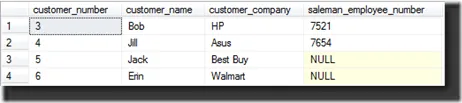
We have filtered out the 2 Dell records.
That is the basics of the where clause.
Please leave any comments or questions below.